Tools like Claude Code, updated versions of GitHub Copilot and other coding agents have changed software development, moving us from simple code suggestions to truly agentic workflows.
The developer community is past the hype phase. We are now figuring out how to use these powerful agents in our daily lives. The potential to boost productivity is real, but so are the friction points.
Nearly a year ago, we at willhaben conducted a structured evaluation of GitHub Copilot and JetBrains AI Assistant. While we found value, there were significant gaps — primarily in the tools’ ability to understand deep context. We concluded that while promising, it still needs a few generations of improved models and tooling to be truly valuable.
To gain an updated first hand perspective, we recently conducted another evaluation within our development team. This time, we went all in. We enlisted 100% of our Product Development department to use these tools for a period of 3 months. The survey not only captured usage frequency but also examined the perceived helpfulness of AI assistants across various development tasks. Did they finally become the “autonomous colleagues” we hoped for?
Here is what we learned from our 2025 survey about the real impact of agentic AI.
Methodology
Participant Selection and Groups
Our approach this year was more comprehensive than in 2024:
- Department-wide Adoption: Instead of a selected group, the entire Product Development department participated.
- Extended Duration: We ran the trial for 3 months (up from 42 days) to allow users to overcome the initial learning curve and form varying habits.
The 2024 responses are based on the feedback of 33 devs, while in 2025 40 developers took part in the survey.
Data Collection and Surveys
To gauge the effectiveness and reception of the AI tools, we implemented a structured survey approach similar to last year, collecting data at the end of the 3-month period. The surveys focused on the developers’ experiences with the AI assistants for specific development tasks:
- Writing code from scratch
- Create unit tests
- Writing documentation
- Understanding code
- Finding bugs
- Optimizing/refactoring code
- Generating commit messages
Participants rated each task on a scale of 1 (never used/not useful) to 5 (very often used/very useful) for both frequency of use and helpfulness.
Focus on Developer Experience
While we track development metrics like Lead Time to Change (LTC) as well as usage data of our LLMs (mainly Claude Sonnet and Opus 4.5, Gemini 2.5 Pro and GLM 4.6), we continue to prioritize survey data as the primary source of insights for this specific evaluation. We used mainly Claude Code, but also allowed other open-source coding agents, as long as they were using a LLM via our LiteLLM proxy set up for central access and monitoring. The “vibe” of the development team, their confidence, their friction points, and their satisfaction are leading indicators of productivity that raw metrics often lag behind. This approach provided valuable perspectives on the developer experience, including the perceived benefits and drawbacks of using “Agentic” tools in everyday tasks.
Survey Results
This section looks at the insights from our developer surveys, revealing not just the frequency of AI assistant usage for specific coding tasks, but also their perceived helpfulness and the overall sentiment towards these tools.
Engagement & Usefulness
The following heatmaps compare usage frequency and perceived helpfulness for each task category between 2024 and 2025, showing the number of responses in percent. The shift toward higher usage and helpfulness is visible across almost every dimension.
Writing Code from Scratch
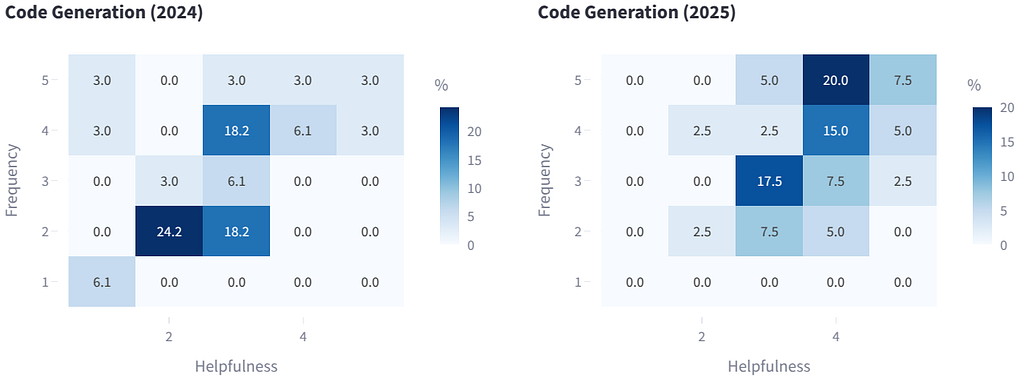
This has shifted from “flawed” to “highly helpful.” Developers now trust the agent to kickstart complex implementations, not just complete lines.
Unit Testing
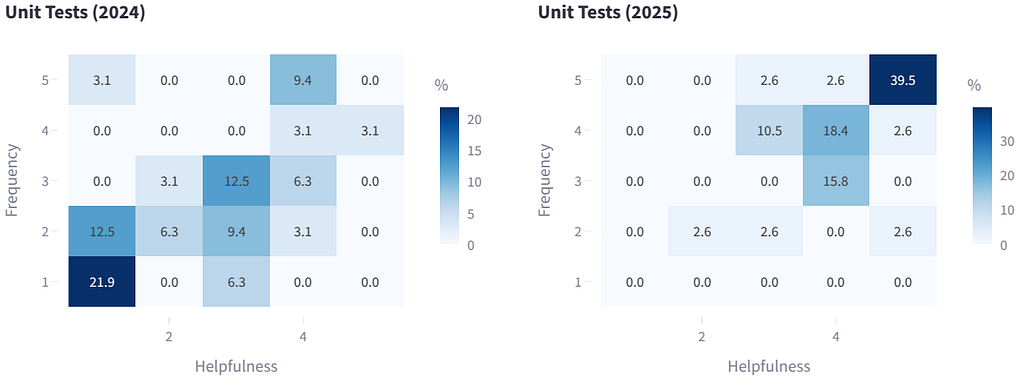
This is the star performer of 2025, with a helpfulness rating of 4.2/5. Developers write the code, and the agent writes the tests. It turns a tedious chore into a fast, verification-heavy workflow.
Writing Documentation
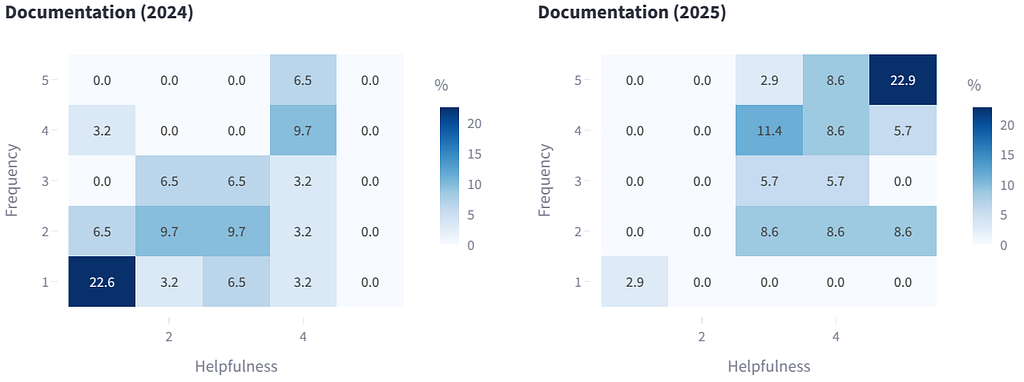
A massive win for developer quality of life. Commands like “Summarize this flow” or “Generate a Mermaid chart” eliminate drudgery and ensure documentation actually gets written.
Understanding Code
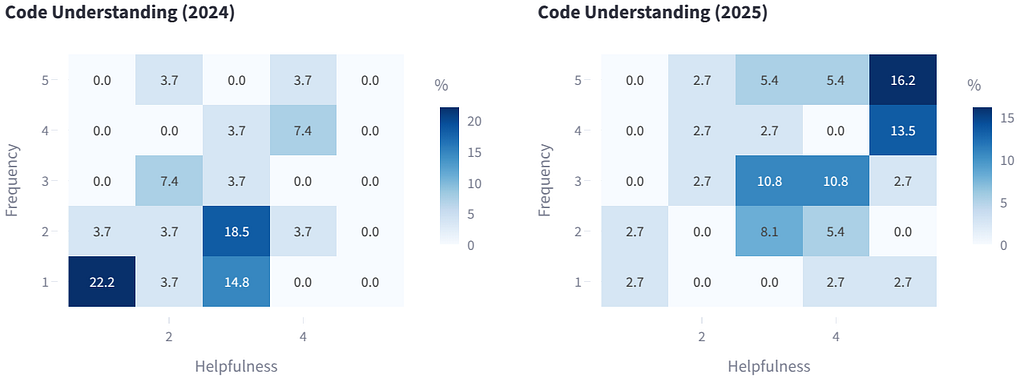
We saw a significant uptake here. Developers are increasingly relying on AI to explain legacy code, using it as a “search engine to discover the codebase.”
Bug Fixing
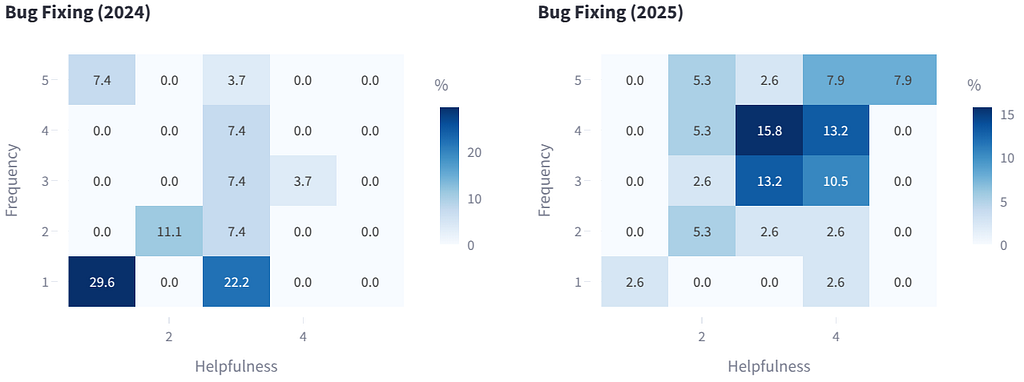
While improved, this remains challenging. Agents struggle with the “magic” of frameworks like Spring, where the code text doesn’t explicitly show the wiring. It still requires a human engineer to understand intention and architecture.
Code Optimization
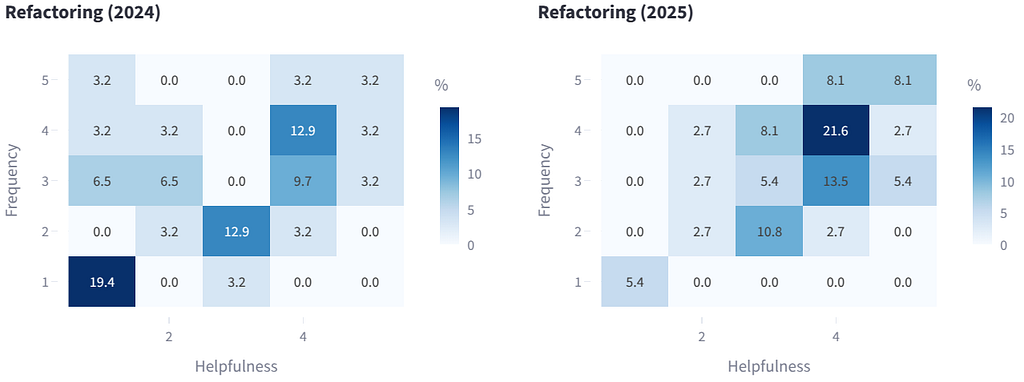
Similar to bug fixing, true optimization requires a holistic view of the system. While agents can suggest local improvements, they often miss the broader architectural implications needed for deep refactoring.
Generating Commit Messages
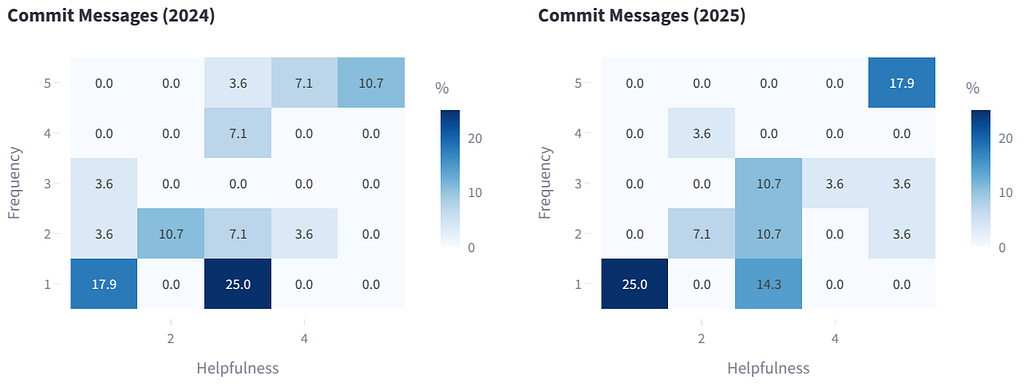
Usage actually dropped here. Without a convenient UI button (in CLI tools like Claude Code), this use case is not as obvious as the other and it is often faster for a developer to just write a simple commit message than to prompt an agent to do it.
Additional Insights from Developer Responses
Beyond the numerical ratings, we analyzed developer sentiment through three open-ended survey questions: “What’s your overall impression?”, “Would you recommend the AI coding assistant to others?”, and “What other use cases do you see?”. From these responses, we identified three distinct “Personas” of adoption:
- The Skeptics: Around 20% of our team feel the effort to fix AI hallucinations outweighs the benefits. For them, the tool is a net negative. They prefer to trust their own code.
- The Pragmatists: The majority of our team. They have developed a “gut feeling” for when the AI helps and when it fails. They use it as a power tool for specific tasks but switch to manual coding when complexity ramps up.
- The Enthusiasts: Another 20% of our team try everything with AI first. They integrate it into their entire workflow-planning, requirements analysis, and breaking down complex tasks. They accept the friction for the capability boost.
Overall Impression
Compared to a little more than a year ago, satisfaction and usage increased on all dimensions.
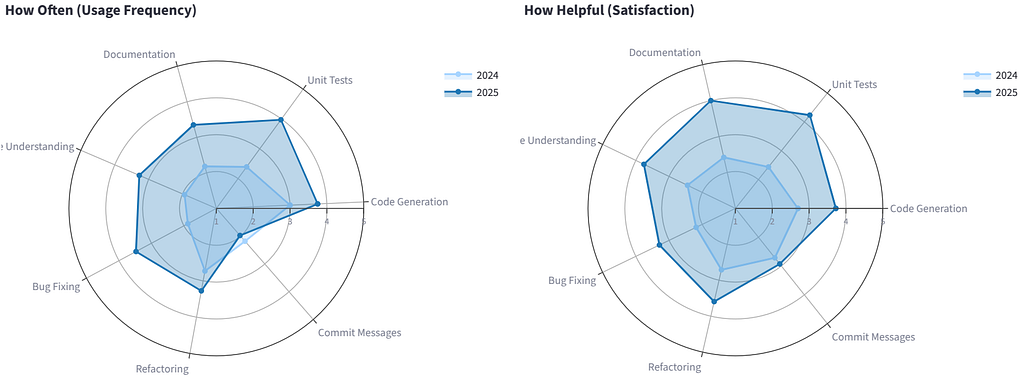
“Even the skeptics in our team now recommend using it, albeit with caution. The consensus is that for tasks like testing and documentation, it is an undeniable time-saver.”
The general sentiment has shifted from “curiosity” to “reliance.” However, the “Magic” is gone — replaced by a realistic understanding of the tool’s limits. It is a tool, not a replacement for engineering skill.
Moving Forward
The Future of Development: Powered by AI
The developer survey results confirmed that AI assistants have graduated from experimental toys to essential development tools. We will continue to deepen the integration of these tools, focusing on “Agentic workflows” that allow for autonomous planning and execution of multi-step tasks.
Addressing Limitations Proactively
We recognize the “adherence gap”, where agents ignore specific project conventions. We are proactively addressing this by formalizing our context (e.g., CLAUDE.md files, slash commands and skills) and treating our prompts as part of our codebase.
Upholding Quality Standards
Experience is still a superpower. A senior developer using an agent can move much faster. We emphasize that the human is still flying the plane. The “the AI did it” excuse is not accepted.
Incremental changes, automated integration, high test coverage, static code analysis and security scans — or in short: Software Engineering Best Practices — are more important than ever.
Exploring New Use Cases
Feedback from the survey has opened up intriguing possibilities for AI applications beyond traditional coding tasks
Workflow Automation
Power users are already using agents to analyze PDF documents, generate OKRs from meeting transcripts, and structure unstructured data. The next step is to integrate agents into our planning workflows, use them as second code reviewer or auto-update documentation.
Knowledge Management
We are exploring how to use these agents to make our internal documentation “chat-able,” allowing for natural language queries against our entire knowledge base.
Rapid Prototyping
Agents excel at generating PoC and MVP prototypes to quickly validate ideas. Developers can describe a concept and get a working skeleton in minutes, enabling faster iteration on alternative approaches before committing to a full implementation.
Making it Work
Our 2025 developer survey has shown that AI coding assistants are now key tools in our stack. The feedback was compelling enough that we decided to continue with the setup after the trial ended. AI assistants are now a permanent part of our development workflow. Their ability to help us, particularly in tasks like code completion, unit testing, and documentation, has proven too valuable to give up.
Despite the enthusiasm, the survey also highlighted challenges. Developers noted difficulties with AI assistants in understanding framework logic and the need for vigilant code reviews.
However, the technology is progressing rapidly. We have moved from “Autocomplete” to “Workflow Automation” and the tools are becoming more capable every day.
Our approach to integrating AI will remain balanced. AI assistants are tools, supplements to human expertise, not substitutes. They offer support, but the core of software engineering — solving problems for people — remains a human job.
AI Dev Buddies 2025: From Autocomplete to Agentic Workflow was originally published in willhaben Tech Blog on Medium, where people are continuing the conversation by highlighting and responding to this story.